

Most people don’t look forward to visiting the dentist, and many arrive at a dental website with a worry: Will it hurt? Do you take my insurance? How much will it cost? Can I get in soon? The best dental websites answer those questions quickly and calmly, then make booking easy.
We looked at dental practice websites in the US, UK and Australia, from a single cosmetic studio to large dental groups, and picked 10 that do this well. For each one, we point out the specific idea worth borrowing for your own practice website.
At a glance
| Practice | Based in | What to borrow |
|---|---|---|
| Tend | USA (multi-city) | A “no judgment” welcome for anxious patients |
| Toothbar | Austin, USA | Services grouped the way patients think |
| Maven Dental | Australia | Help pages for common symptoms |
| Western Dental | California and Arizona, USA | Spanish language and first-visit guidance |
| Aspen Dental | USA (nationwide) | Booking that starts with the reason for the visit |
| Smile Doctors | USA (nationwide) | A simple three-step path to a consultation |
| Bupa Dental Care | UK | Ways to pay explained clearly |
| Coast Dental | Florida, Georgia and Texas, USA | A dedicated page for uninsured patients |
| Bright Now! Dental | USA (multi-state) | Evening, weekend and walk-in options up front |
| Gentle Dental | Massachusetts and New Hampshire, USA | A new patient offer that’s easy to understand |
1. Tend
Website: hellotend.com
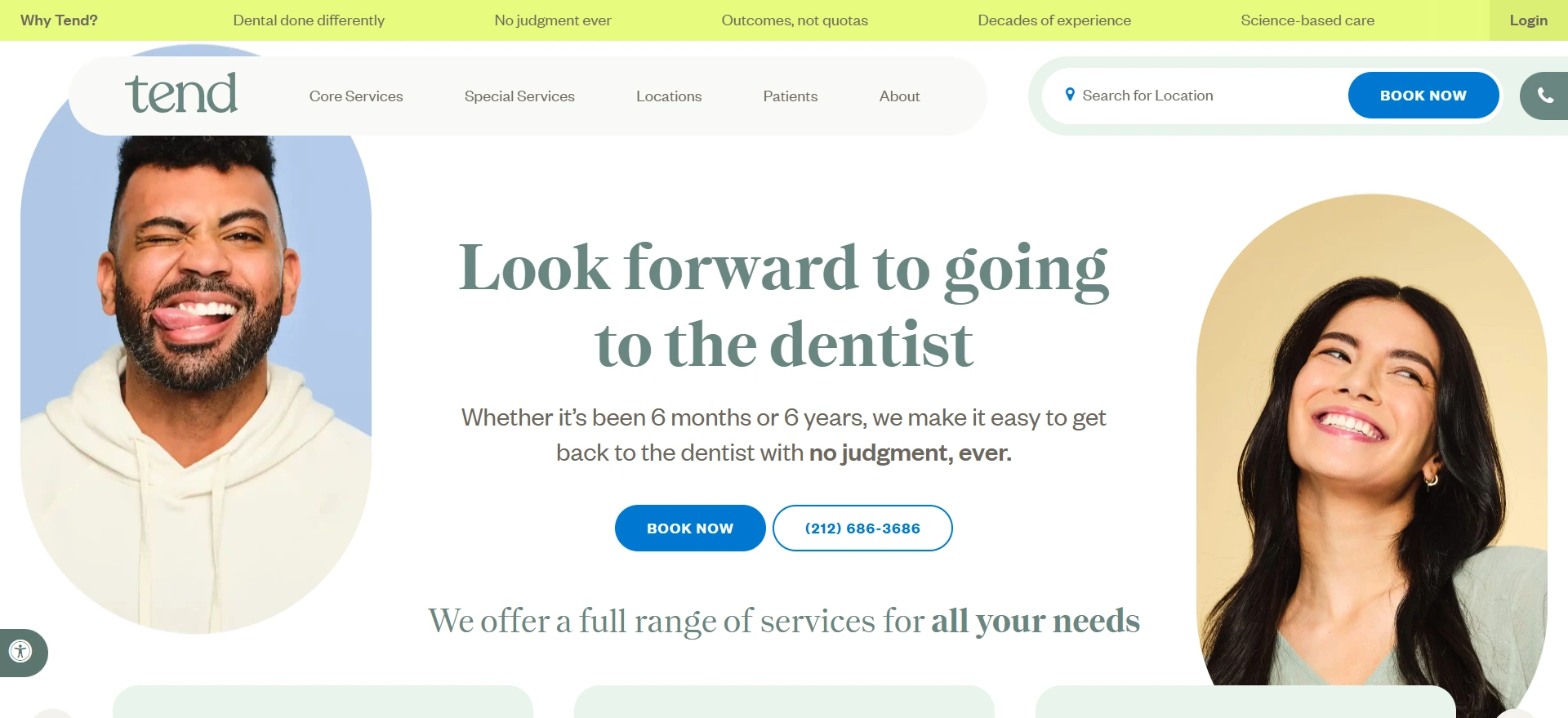
Tend’s homepage headline is “Look forward to going to the dentist,” followed by a promise that you can come back whether it’s been six months or six years, with “no judgment, ever.” For patients who have been putting off a visit, that one line removes a big barrier.
The practical tools sit right below: “Book Now” in the header and hero, a search to find a nearby studio, and a “Check your insurance” tool. The site also lists the details patients care about, such as same-day appointments, evening and Saturday hours, and online booking.
What to borrow: Speak directly to nervous or embarrassed patients. A short, reassuring headline can do more than a list of services.
2. Toothbar

Website: toothbar.com
Toothbar is a single cosmetic and general dental practice in Austin, and its website shows how an independent practice can look polished and clear. Services are grouped into Cosmetic, Restorative and Preventive dentistry, which matches the way patients think about what they need.
The practice has its own branded touches, like a lounge for cleanings and whitening, and the homepage lists the address, opening hours, phone number and accepted insurance plans. “Book Appointment” appears throughout, and a team section introduces the dentists by name.
What to borrow: Group your services by patient goal, such as “fix a problem,” “improve my smile” or “keep my teeth healthy,” rather than listing every treatment in one long menu.
3. Maven Dental

Website: mavendental.com.au
Maven Dental works with local dentists across Australia, and its navigation includes something many dental sites miss: a “Help Me With” menu. It leads to guides for common concerns like toothache and gum disease, so patients can start with their problem instead of a treatment name.
Practices can be found by city or state, and “Book an Appointment” sits in the header. Payment options and health fund information each have their own section, and an FAQ covers costs, emergencies and children’s dentistry.
What to borrow: Create pages for the symptoms people search for, like “toothache” or “bleeding gums.” They answer real questions and can bring in search traffic from patients who need help now.
4. Western Dental

Website: westerndental.com
Western Dental serves a large community of families in California and Arizona, and its website reflects that. A Spanish-language toggle sits in the top bar, alongside quick links to manage an appointment and pay a bill.
The site explains which insurance and public coverage plans it accepts, and a “What to expect” section prepares nervous first-time patients for their visit. “Book an appointment” appears in the header, in the hero and at the end of the page.
What to borrow: If your patients speak more than one language, offer your website in those languages. Also add a “first visit” page that explains what happens, step by step.
5. Aspen Dental
Website: aspendental.com
Aspen Dental’s booking flow starts with a question: what’s the reason for your visit? Patients can pick dentures, implants, clear aligners, an emergency or a checkup, which routes them to the right kind of appointment from the start.
The site also shows a selected nearby office with its address, hours and reviews, and lists other offices in the area. A smile preview tool and an FAQ give patients more reasons to engage before they book.
What to borrow: Ask what brings the patient in before you ask for their details. It makes booking feel personal and helps your front desk prepare.
6. Smile Doctors

Website: smiledoctors.com
Smile Doctors is an orthodontic group, and its homepage keeps the journey simple: find an orthodontist, book a free consultation, and start a treatment plan. A location search by city, state or ZIP code sits right in the hero.
A comparison table helps patients understand the difference between braces, Invisalign and other aligner options, including whether insurance is billed directly. A “Your First Visit” page and a patient app support the rest of the journey.
What to borrow: If patients have to choose between treatment options, give them a simple comparison. It builds trust and makes the consultation more productive.
7. Bupa Dental Care

Website: bupa.co.uk/dental
Bupa Dental Care runs practices across the UK, and its dental pages are clear about something patients often find confusing: how to pay. The site explains NHS and private care, pay-as-you-go, a monthly plan for routine care, and dental insurance, each with its own page.
A practice finder, an emergency dental page, a symptom checker and a section for nervous patients round out the experience. The FAQ explains that fees are listed on each practice’s own page.
What to borrow: Explain your payment options in plain language. When patients understand how they’ll pay, booking feels much less risky.
8. Coast Dental

Website: coastdental.com
Coast Dental has offices across Florida, Georgia and Texas, and its “Insurance & Financing” menu includes a page specifically for uninsured patients. That small decision tells a large group of potential patients that they are welcome too.
Special offers have their own menu item, emergency dentistry promises same-day appointments whenever possible, and “Book Now” links directly to online scheduling.
What to borrow: If you see patients without insurance, give them their own page that explains costs, membership plans or financing. Don’t make them guess.
9. Bright Now! Dental

Website: brightnow.com
Bright Now! opens with “Your go-to dentist” and quickly answers a common question: when can I come in? A section highlights evening and weekend hours, and emergency care is explained with call-ahead and walk-in options.
The site also covers accessibility, including ASL interpreters and disability accommodations, and a “What to Expect” page explains the first visit. An office finder lists locations state by state.
What to borrow: If you offer evening, weekend or same-day appointments, say so clearly on the homepage. Convenience is often the deciding factor for busy patients.
10. Gentle Dental

Website: gentledental.com
Gentle Dental’s headline, “Dental Care Made Easy,” sets the tone. The homepage presents a new patient offer that spells out exactly what’s included (exam, X-rays, cleaning and a treatment plan), so there’s no guesswork.
Services are grouped into seven clear categories, a location finder covers Massachusetts and New Hampshire, and an FAQ explains the difference between dental plans and insurance. Awards and patient testimonials add social proof.
What to borrow: If you run a new patient offer, list exactly what’s included. A clear bundle is more convincing than a vague discount.
What every dental website needs
Across these 10 sites, the same basics come up again and again:
- Online booking in the header. Make it visible on every page, with a phone number next to it.
- Clear insurance and payment information. List accepted plans, explain options for uninsured patients, and mention financing.
- A reassuring tone for anxious patients. A “first visit” page and comfort options like sedation help nervous patients take the next step.
- Service pages organised by patient need. Preventive, restorative, cosmetic and emergency care are easier to scan than a long treatment list.
- Location details and hours. Keep your address, phone number and hours consistent with your Google Business Profile.
- Real team photos and dentist bios. Patients want to know who will be treating them.
- Dentist schema markup. Structured data for your practice (Dentist is a schema.org type) helps search engines understand your services, hours and location.
Looking for more inspiration? See our lists of the best restaurant websites and the best bakery websites.
How much does a dental website cost?
It depends on the size of the practice and what the site needs to do. A single-location practice with service pages, team bios and online booking is a smaller project than a multi-location group with location pages, insurance tools and patient forms. Integrations with your booking or practice management software also affect the scope.
If you’re planning a new dental website or a redesign, tell us about your project and we’ll give you a clear, fixed-price quote.
Frequently asked questions
What should a dental website include?
Online booking, your phone number, services, insurance and payment information, team bios with photos, location and hours, and a page that explains what to expect at the first visit.
How can a dental website attract more new patients?
Make booking easy, answer insurance and cost questions clearly, use real photos of your team and office, and create pages for common treatments and symptoms that people search for, such as “emergency dentist” or “teeth whitening.”
Should a dental website have online booking?
Yes, if your practice management system supports it. Plenty of patients want to book in the evening, after your office has closed. If online booking isn’t possible, make the phone number and a simple appointment request form easy to find.
How does local SEO work for dentists?
Keep your name, address and phone number consistent everywhere, keep your Google Business Profile updated with photos, hours and services, create a page for each location, ask happy patients for reviews, and add Dentist schema to your site.
Planning a dental website? PosySites designs and builds WordPress websites for dental practices, with local SEO built in from the start. Start a project.
